Author Archives: Mark Fenner

Gentoo (continued …)

So, I finally decided to try to track down the microphone issues.  As always, this involved descending into the rabbit hole for a little while.  My first goal was to get a (slightly) newer kernel.  I was running gentoo-sources-3.10.7 from a genkernel and I wanted to run gentoo-sources-3.11.6 with a manual configuration.  Some of my hardware (on my MSI Z77A-GD65 LGA 1155 Intel Z77 motherboard) is listed in my sound wrangling write-up.  I also mentioned my irritation at mapping between kernel configuration options (aka, navigating menuconfig), CONFIG_FOO (as listed in .config), and kernel module names (for example, from lspci -k).  Using my hardware, I’ll show a somewhat workable way to get from hardware to a menuconfig option.

Spelunking Hardware to Kernel Config Menu Options

# lspci 
00:00.0 Host bridge: Intel Corporation Xeon E3-1200 v2/3rd Gen Core processor DRAM Controller (rev 09)
00:01.0 PCI bridge: Intel Corporation Xeon E3-1200 v2/3rd Gen Core processor PCI Express Root Port (rev 09)
00:02.0 VGA compatible controller: Intel Corporation Xeon E3-1200 v2/3rd Gen Core processor Graphics Controller (rev 09)
00:14.0 USB controller: Intel Corporation 7 Series/C210 Series Chipset Family USB xHCI Host Controller (rev 04)
00:16.0 Communication controller: Intel Corporation 7 Series/C210 Series Chipset Family MEI Controller #1 (rev 04)
00:19.0 Ethernet controller: Intel Corporation 82579V Gigabit Network Connection (rev 04)
00:1a.0 USB controller: Intel Corporation 7 Series/C210 Series Chipset Family USB Enhanced Host Controller #2 (rev 04)
00:1b.0 Audio device: Intel Corporation 7 Series/C210 Series Chipset Family High Definition Audio Controller (rev 04)
00:1c.0 PCI bridge: Intel Corporation 7 Series/C210 Series Chipset Family PCI Express Root Port 1 (rev c4)
00:1c.6 PCI bridge: Intel Corporation 7 Series/C210 Series Chipset Family PCI Express Root Port 7 (rev c4)
00:1c.7 PCI bridge: Intel Corporation 7 Series/C210 Series Chipset Family PCI Express Root Port 8 (rev c4)
00:1d.0 USB controller: Intel Corporation 7 Series/C210 Series Chipset Family USB Enhanced Host Controller #1 (rev 04)
00:1f.0 ISA bridge: Intel Corporation Z77 Express Chipset LPC Controller (rev 04)
00:1f.2 SATA controller: Intel Corporation 7 Series/C210 Series Chipset Family 6-port SATA Controller [AHCI mode] (rev 04)
00:1f.3 SMBus: Intel Corporation 7 Series/C210 Series Chipset Family SMBus Controller (rev 04)
01:00.0 VGA compatible controller: NVIDIA Corporation GF114 [GeForce GTX 560 Ti] (rev a1)
01:00.1 Audio device: NVIDIA Corporation GF114 HDMI Audio Controller (rev a1)
03:00.0 IDE interface: ASMedia Technology Inc. ASM1061 SATA IDE Controller (rev 01)
04:00.0 FireWire (IEEE 1394): VIA Technologies, Inc. VT6315 Series Firewire Controller (rev 01)

You can also get the kernel modules used by the hardware with lspci -k.  For brevity, I’ll just grab the modules:

# lspci -k | grep use | awk '{ print $5; }' | sort | uniq
ahci
e1000e
ehci-pci
i915
nvidia
pcieport
snd_hda_intel
xhci_hcd

Not so awful.  Now, as I was cruising the web looking for some info, I stumbled across the following helpful command-line to tie “most” module names back to CONFIG_ lines (I lost it, but I found the URL in my browsing history):  grep -R –include=Makefile ‘\bNAME\.o\b’.  For example:


# grep -R --include=Makefile '\be1000e\.o\b'
drivers/net/ethernet/intel/e1000e/Makefile:obj-$(CONFIG_E1000E) += e1000e.o

This one isn’t too surprising.  We see that e1000e.o is tied to CONFIG_E1000E.  In turn, we can jump into menuconfig (or xconfig) and search for CONFIG_E1000E (in menuconfig, type a forward-slash “/”; in xconfig, go to the find option).  In either case, we get a most useful piece of information:

Prompt: Intel(R) PRO/1000 PCI-Express Gigabit Ethernet support
Location:
-> Device Drivers
-> Network device support (NETDEVICES [=y])
-> Ethernet driver support (ETHERNET [=y])
-> Intel devices (NET_VENDOR_INTEL [=y])

Now, the only issue is navigating to that spot and enabling the feature as a module or as a built-in.  Not too shabby.  Hopefully, I won’t forget in six or twelve months when I think about building a kernel again.

Two other useful sources of information (note, I plugged in my once-in-a-while USB devices):

# lsusb
Bus 001 Device 002: ID 8087:0024 Intel Corp. Integrated Rate Matching Hub
Bus 002 Device 002: ID 8087:0024 Intel Corp. Integrated Rate Matching Hub
Bus 003 Device 002: ID 046d:08ad Logitech, Inc. QuickCam Communicate STX
Bus 001 Device 001: ID 1d6b:0002 Linux Foundation 2.0 root hub
Bus 002 Device 001: ID 1d6b:0002 Linux Foundation 2.0 root hub
Bus 003 Device 001: ID 1d6b:0002 Linux Foundation 2.0 root hub
Bus 004 Device 001: ID 1d6b:0003 Linux Foundation 3.0 root hub
Bus 001 Device 003: ID 046d:c506 Logitech, Inc. MX700 Cordless Mouse Receiver
Bus 002 Device 005: ID 04a9:220e Canon, Inc. CanoScan N1240U/LiDE 30
Bus 002 Device 006: ID 091e:2459 Garmin International GPSmap 62/78 series
# aplay -l
**** List of PLAYBACK Hardware Devices ****
card 0: PCH [HDA Intel PCH], device 0: ALC898 Analog [ALC898 Analog]
 Subdevices: 1/1
 Subdevice #0: subdevice #0
card 0: PCH [HDA Intel PCH], device 1: ALC898 Digital [ALC898 Digital]
 Subdevices: 1/1
 Subdevice #0: subdevice #0

The camera uses gspca_zc3xx .  Which you can track, using the steps above, to this menu option:

Multimedia support -->
 [*] Cameras/video grabbers support 
 [*] Media USB Adapter
 --> [M] GSPCA based webcams
 --> [M] ZC3XX USB Camera Driver

I started with a kernel seeds 3.6.11 kernel as my base build, and I added a few things.  And removed a few things.  I made a diff, which I need to figure out how to conveniently host and attach to this post.  <<link to diff>>

NVIDIA Wrangling

So, that got me a running kernel.  Next, I realized the reason I hadn’t gone to a 3.6.11 kernel sooner.  NVIDIA’s official drivers (which I need for a dedicated GPU computing card) do not support >=3.6.11 kernels right now.  So, I needed to grab a patch for the nvidia drivers.  Fortunately, one was available.  Grab the tar file that is attached to that link and you can get suitable patches for several versions of the nvidia kernel drivers.  I was expecting to have to (1) hack a nvidia-drivers ebuild and (2) futz with a /usr/local/portage type solution … but, low and behold, all I had to do was copy the patch to (I only wanted to patch one specific version of the drivers; I’m using 325.15):

/etc/portage/patches/x11-drivers/nvidia-drivers-325.15/get_num_physpages_325-331.patch

and emerge -avq nvidia-drivers.  Poof.  Almost easy.  I made some use of emerge @module-rebuild and emerge @x11-module-rebuild and had a working X11 very shortly thereafter.

Last but not least ….

If your memory is good, you might recall that the whole reason I undertook this project was to get my microphone working.  Who knows if the kernel upgrade helped, but with some tweaking I got it working tolerably in Skype.  This was pure, stubborn, knob fiddling.  Here are the final fiddles.  The first image is from kmix (you can do the same in alsamixer, this was easier for my screen grab).  I’m not sure if I mixed-and-matched with Capture 2 before.  Also, I tried different combinations of Rear Mic Boost to eliminate a good bit of static in my system, but with other fixes, this flat moderate level seemed to do fine.  One oddity:  kmix doesn’t show the correct PCM setting (which you can see in alsamixer).  Yes, there is a PCM channel you can select under Setting->Configure Channels.  But it isn’t the right PCM channel.  Odd.
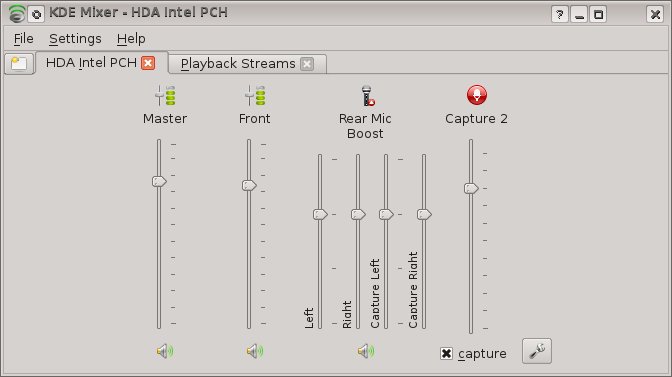
kmix-settings

The second image is from Skype.  I don’t think I had noticed an Analog option before.  What’s more, it had to be the “Alt Analog”.  I don’t know if I tried it or if it was available due to driver differences in the kernel.
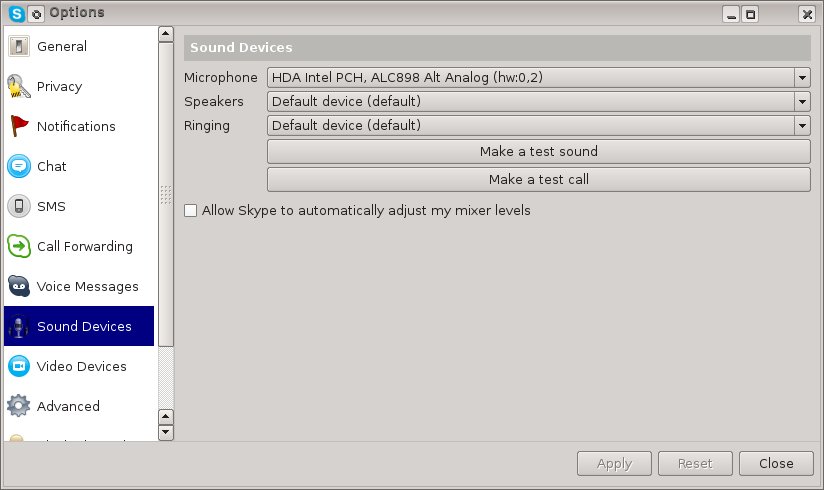
skype-settingsAfter all that, my Skype Test Call finally worked.  Yay.  A practical, if not exciting, denouement.
The Variable Professoriate

In a recent article in the Economist there is a bit of cherry-picked data, which highlights one of my biggest pet peeves:  painting all faculty with the same brush.  Here’s  a quote:

Full professors in America earned on average $135,000 in 2012—more than judges did.

Now, if you read the AAUP Salary Report (in particular, Table 4), you’ll see that yes indeed, full professors at R1 (Category 1, Doctoral institutions) make ~$135,000/year.  However, you need to keep reading.  At Cat IIA and IIB (Master’s and Bachelor’s institutions), full professors make ~$92,000/year.  That’s about a $40K or 43.7% (quickly approaching 50%) difference.

The variance in what it means to be a faculty member, both in responsibilities and compensation, is very high.

Now, two other points:

  1. What about distribution of faculty?  Glad you asked.  See Table 13.  I was surprised, at first, that ~50% of faculty are at Cat I schools.  I thought that given the relatively few Cat I schools compared to many more Cat II, Cat III (and I don’t have those percentages – there may be a much higher percent of Cat I than I imagined), that there would be more Cat II/III faculty.  However, if you consider the size of each department (e.g., many smaller schools have 5-10 Math and CS faculty combined, while many Cat I schools will have 30-50 Math & CS faculty … plus Engineering, etc.).
  2. To the main point of the original article (which is a critique of modern scientific practice and its incentive structure), the overwhelming majority of scientific publication is done by Cat I faculty.  So, while the statement made was false, the true statement “Full professors [at primarily research institutions] in America earned on average $135,000 in 2012—more than judges did” is both true and relevant to the article.

Great VT Vacation

We (the DrsFennerThree) had a great trip to VT.  Since we lived there for several years, we have a great base of friends and local-spots that we like to visit.  Add to that that fact that there are some great mountain biking destinations, some folks that can watch E for a bit while MrsDrFenner and I bike, great food spots, wonderful VT beer, oh yeah, and that little thing “fall foliage” that people seem to rave about … Well, it all adds up to a great trip.  I’m hoping to add to this post with some pictures and GPX tracks.  I’m not sure the best (or reasonable) ways to do those.  So, it may be a few days before this all looks the way I’d like.

The sound (and the fury)

Linux (namely, handspun distros) definitely has some rough edges.  Multimedia can be one of them.  I’m currently working on solving a sound issue:  really, it’s the microphone.  It won’t record anything.  And debugging it isn’t a whole lot of fun.  But, there are tools.  lspci -vvnk gets you a very detailed list of what the kernel sees on the hardware side of things.  Adding -s lets you focus on the device of interest.  Quick question:  how do you get the slot-id to use with -s?  Use a different lspci command.

# lspci | grep Audio
00:1b.0 Audio device: Intel Corporation 7 Series/C210 Series Chipset Family High Definition Audio Controller (rev 04)
01:00.1 Audio device: NVIDIA Corporation GF114 HDMI Audio Controller (rev a1)

And, now, since I’m dealing with the Intel sound device, I know that I care about slot 00:1b.0

# lspci -vvnnk -s 00:1b.0
00:1b.0 Audio device [0403]: Intel Corporation 7 Series/C210 Series Chipset Family High Definition Audio Controller [8086:1e20] (rev 04)
 Subsystem: Micro-Star International Co., Ltd. Device [1462:d751]
 Control: I/O- Mem+ BusMaster+ SpecCycle- MemWINV- VGASnoop- ParErr- Stepping- SERR- FastB2B- DisINTx+
 Status: Cap+ 66MHz- UDF- FastB2B- ParErr- DEVSEL=fast >TAbort- <TAbort- <MAbort- >SERR- <PERR- INTx-
 Latency: 0, Cache Line Size: 64 bytes
 Interrupt: pin A routed to IRQ 45
 Region 0: Memory at f6a30000 (64-bit, non-prefetchable) [size=16K]
 Capabilities: [50] Power Management version 2
 Flags: PMEClk- DSI- D1- D2- AuxCurrent=55mA PME(D0+,D1-,D2-,D3hot+,D3cold+)
 Status: D0 NoSoftRst- PME-Enable- DSel=0 DScale=0 PME-
 Capabilities: [60] MSI: Enable+ Count=1/1 Maskable- 64bit+
 Address: 00000000feeff00c Data: 4122
 Capabilities: [70] Express (v1) Root Complex Integrated Endpoint, MSI 00
 DevCap: MaxPayload 128 bytes, PhantFunc 0, Latency L0s <64ns, L1 <1us
 ExtTag- RBE- FLReset+
 DevCtl: Report errors: Correctable- Non-Fatal- Fatal- Unsupported-
 RlxdOrd- ExtTag- PhantFunc- AuxPwr- NoSnoop-
 MaxPayload 128 bytes, MaxReadReq 128 bytes
 DevSta: CorrErr- UncorrErr- FatalErr- UnsuppReq- AuxPwr+ TransPend-
 LnkCap: Port #0, Speed unknown, Width x0, ASPM unknown, Latency L0 <64ns, L1 <1us
 ClockPM- Surprise- LLActRep- BwNot-
 LnkCtl: ASPM Disabled; Disabled- Retrain- CommClk-
 ExtSynch- ClockPM- AutWidDis- BWInt- AutBWInt-
 LnkSta: Speed unknown, Width x0, TrErr- Train- SlotClk- DLActive- BWMgmt- ABWMgmt-
 Capabilities: [100 v1] Virtual Channel
 Caps: LPEVC=0 RefClk=100ns PATEntryBits=1
 Arb: Fixed- WRR32- WRR64- WRR128-
 Ctrl: ArbSelect=Fixed
 Status: InProgress-
 VC0: Caps: PATOffset=00 MaxTimeSlots=1 RejSnoopTrans-
 Arb: Fixed- WRR32- WRR64- WRR128- TWRR128- WRR256-
 Ctrl: Enable+ ID=0 ArbSelect=Fixed TC/VC=01
 Status: NegoPending- InProgress-
 VC1: Caps: PATOffset=00 MaxTimeSlots=1 RejSnoopTrans-
 Arb: Fixed- WRR32- WRR64- WRR128- TWRR128- WRR256-
 Ctrl: Enable+ ID=1 ArbSelect=Fixed TC/VC=22
 Status: NegoPending- InProgress-
 Capabilities: [130 v1] Root Complex Link
 Desc: PortNumber=0f ComponentID=00 EltType=Config
 Link0: Desc: TargetPort=00 TargetComponent=00 AssocRCRB- LinkType=MemMapped LinkValid+
 Addr: 00000000fed1c000
 Kernel driver in use: snd_hda_intel
 Kernel modules: snd_hda_intel
#

Should have grabbed some other pieces of information first:

I’m trying to enable built-in sound on:

  • Motherboard: MSI Z77A-GD65 LGA 1155 Intel Z77
  • lspci: Audio device [0403]: Intel Corporation 7 Series/C210 Series Chipset Family High  Definition Audio Controller [8086:1e20] (rev 04)
  • lspci:  Subsystem: Micro-Star International Co., Ltd. Device [1462:d751]
  • kernel module:  snd_hda_intel
  • tail -1 /etc/modprobe.d/alsa.conf: options snd-hda-intel model=auto
  • grep /proc/asound/card0/codec#0: Codec Realtek ALC898
  • grep /proc/asound/card0/codec#1: Intel PantherPoint HDMI

I’m not at all convinced that the codecs are being chosen correctly with the model=auto option for snd.  Why?  Because the control sets in alsamixer seem way too convoluted (which I think I’ve dealt with after dealing with driver mismatches).

I ended up calling the microphone a *fail* for now.  The only thing I need it for is Skype and I can skype on a different machine.  I ended up with this line in /etc/modprobe.d/alsa.conf:

options snd-hda-intel model=auto position_fix=1 enable_msi=1

Some folks had luck with the postition_fix parameter getting the microphone working.  For me, it simply convinced me that the mic was picking up the environment and not just amplifying noise/feedback in the system.  The various hda devices have “pin” configurations with different attributes (input, output, enabled, disabled, etc.) that you can see with a python program:  hda_analyzer.py.  However, that looked intimidating enough that I didn’t want to try to experiment with it.  So, for now, no mic.  But sound works fine.

Gentoo (continued …)

So, I absolutely love Gentoo.  I really do.  It solves a large number of problems and headaches that I’ve had over the years.  Basically, the most important problem it solves for me is the good ole’ Red Hat dependency hell (RHEL).  The dependency issue is magnified (greatly!) when you are working with lots of scientific packages (R, numpy, octave, maxima, etc.) because they, in turn, rely on things like BLAS/ATLAS and other building block libraries.  Anyway, between managing these dependencies in a reasonable way (compilation remove some the problem of specific versions; the package management system take care of most of the other problems) and the added performance benefit of compiling for my architecture with latest compilers (yes, I know, most of the time this benefit is overstated — unless you have before and after performance numbers and multiply that by the amount of time you spend on those computations and see a win).

For all that win, I do pay a price.  I’m beyond the phase of emerge -uDavNq world weekly (or daily).  I typically only do a kernel once a year.  But, emerge world once a month and that kernel build do end up taking a bit of time.  When I don’t do it often enough, I forget the “right” procedure to use as I go through it (I could write it down, but if it’s been that long, the procedure will be different anyway.  The difference is between small incremental modifications and large batch change.)  And, when I build a new system, I usually have to use genkernel to start out with.  When I find time, I do a hand kernel .config.  The other large price to be paid when moving to a new system is dealing with (the evil) xorg.conf.  Now, I’ve generally had nVidia graphics cards in my desktops for the past decade (and intel chipsets in my laptops).  However, my new rig has built-in intel and an add-on PCI-e nVidia card.  I plan on mainly using the nVidia card for scientific GPU use.  So, I’m running my (dual) monitors through the intel on-board.

Well, I had a few issue from (1) lazy configuration and (2) lazy configuration.  Really, two issues.  (1) I used genkernel which didn’t enable Device Drivers -> Graphics Support -> Direct Rendering Manager -> “Enable modesetting on intel by default” [in the .config it is CONFIG_DRM_I915_KMS=y].  See:  wiki.gentoo.org/wiki/Intel

Incidentally, the lack of easy mapping between menuconfig options, .config entries, and kernel module names has always really annoyed me.  Maybe there’s a good solution out there I don’t know about.  Issue (2):  I had accidentally emerged xorg-x11 (which pulls in xorg-drivers) without setting VIDEO_CARDS in /etc/portage/make.conf. That’s a new location for me. Since I started with Gentoo in about 2002, make.conf has lived in /etc.  I did see warnings about this on my older system.  The config snafu meant I had a ton of x11-drivers/xf86-video-* junk everywhere.  Which made diagnosing the problem a bit more difficult — there were plenty of xorg drivers ready to jump in when the xorg intel driver failed.

Turns out, with the intel drive configured improperly (no kernel modesetting), the intel kernel driver and/or the Xorg intel driver were not loading and it was falling back to VESA.  The net result was that when I tried to use xrandr to detect the multiple monitors (and get their names to use in xorg.conf, err, xorg.conf.d), there was only one monitor showing (which was odd, b/c the monitor was being mirrored – duplicated – even with VESA.  I’m all like:  look dude, there are two monitors in use.  Tell me their names!).  After sorting out the kernel:

genkernel --no-clean --menuconfig all

and a reboot, the intel driver was operational – I even got FB and dual mirroring support for my console.  (Yes, theoretical risk in not running a clean – or mrproper for that matter.  But, over at least 5 years or so, I’ve been able to do “quick” recompiles and not get hosed by it.)

The last issue was a good bit of confusion as to the proper xorg.conf/xorg.conf.d contents for setting “just” the monitors to be side-by-side.  Turns out, you don’t need a whole heck of a lot.  You don’t need a Device, a Screen, or any such.  Just do this:

# cat /etc/X11/xorg.conf.d/40-monitor.conf
Section "Monitor"
 Identifier "HDMI1"
 Option "Primary" "true"
EndSection
Section "Monitor"
 Identifier "VGA1"
 Option "LeftOf" "HDMI1"
EndSection

Nice.  Compared to the old necessity of hacking together *everything* under the sun into an xorg.conf, I like the new directory structure (compartmentalizing the config) and the usable defaults (removing boilerplate) makes life easy.  After you get it right.  I had a few tries with a Device entry that wasn’t needed.  This ultra-clean configuration came from:  https://wiki.archlinux.org/index.php/Multihead .

Gentoo

Well, I’m still wanting to work on the mathematics related post.  However,  my (old) computer has decided to get a bit unstable (it’s ok, it’s five years old).  So, I’ve had to take a slight detour and get my new machine up to “desktop” status.  I had it all working.  Well, except for any of the user level stuff:  dual monitors, skype, camera, etc.  And, since I hadn’t fired it up recently (I’d only been using it as a compute-horsepower juggernaut), I also need to update the darn thing.  So, I’m currently doing an:

emerge -uDavN --quiet world

Which will take a while.  And, I have to transfer a few hundred gig of files over.  Yes, I’m just unplugging and replugging the RAID array.  But, the home directory is on an old drive and I want to copy that to a new drive.  So, there’s a bit of work to be done before beta is up and fully running.  But, it will be nice because beta is really fast.  No, not so fast that I paid for diminishing returns.  But, really fast enough to make me smile.

iPython

Oddly, although I’ve been using the scientific Python stack for about 10 years, I’ve never jumped on the iPython band-waggon.  Well, I’ve fired it up once or twice, but I’ve never really dug into using it.  I’ve gotten more curious about the iPython notebook facility (I assume this idea traces back to Mathematica’s notebook nomenclature).  Anyway, I decided to see what all the fuss is about (and by fuss, I mean the fact that a large number of folks at SciPy 2013 gave their presentations in iPython or https://www.wakari.io/gallery notebooks.  So, here goes.

Obviously, I could start with wakari in about five minutes, but I always like to try to “spin my own” first.  I’m on gentoo and I have iPython installed.  So, after browsing through the iPython notebook page (linked above), I found the magical incantation:

ipython notebook

As is fairly typical in the roll your own universe, I got an error:

Traceback (most recent call last):
 File "/usr/bin/ipython-python2.7", line 9, in <module>
 load_entry_point('ipython==0.13.2', 'console_scripts', 'ipython')()
 File "/usr/lib64/python2.7/site-packages/IPython/frontend/terminal/ipapp.py", line 388, in launch_new_instance
 app.initialize()
<snip> boy error messages are "noisy" </snip>
File "/usr/lib64/python2.7/site-packages/IPython/frontend/html/notebook/__init__.py", line 8, in <module>
 raise ImportError(msg)ImportError: The IPython Notebook requires tornado >= 2.1.0

But, a quick emerge -av www-servers/tornado and ipython notebook I was off and running:

ipython-start

A simple click on the New Notebook button:

new-notebook-button

and I had an (i)python prompt.  Part of my goal with this is to experiment with formatting of hybrid text, mathematics, and (mostly python) source code for a book.  I have an idea in mind, but much like artistry, I have to figure out (clarify and implement) what I have in my head.  Anyway, as a simple example, I’m going to play with some description, mathematics, and code for the time-honored method of linear regression.  And for that, I’m going to switch over to my notebook.  Hopefully, I’ll be able to share it @http://nbviewer.ipython.org/.  I’ll also try the static html export facility to dump it here.

So, it turns out I was a bit ahead of myself.  Emerging tornado installed a half-baked, and somewhat broken, MathJax processing.  This resulted in some weird “this works, that doesn’t” \(LaTeX\) support.  I uninstalled iPython and www-servers/tornado and I made some edits to /etc/portage/package.use:

mfenner [528] % grep dev-python/ipython /etc/portage/package.use
dev-python/ipython -wxwidgets matplotlib examples notebook

The change resulted in a much happier installation.

I dug up (“Googled”) a few resources for editing the notebooks, but the underlying URLs are are a bit ugly (they might break): Rich Display System and  Markdown Cells.

First Math Post

One of the main topics I intend to blog about is mathematics (and programming and Python and pedagogy).  So, I need some machinery.  It appears that WordPress has some facilities using the WP LaTeX plugin and the MathJax-LaTeX plugin.  Here, I’m hoping to try out the mathjax one.

A simple, beautiful in-line equation is Euler’s identity, \(e^{\pi i}+1=0\).  I surrounded the usual LaTeX mathematics with \ ( and \ ) for inline mode [I need to figure out how to display mathjax meta-symbols when mathjax is running].  Doing that, with no other mathjax-latex plugin content on the page, requires including \ [ mathjax \ ] somewhere to enable the plugin.  Euler’s identity is more commonly written (and shown in display “whole line” or paragraph mode): \[e^{\pi i}=-1\]

So that’s LateX on WordPress (or, correctly \(\LaTeX\)).  Euler, if I remember correctly, had something like 16 children.  He is a patron-saint of modern, father-academic-mathematicians.

Next up, I’ll see if I can follow http://blog.fperez.org/2012/09/blogging-with-ipython-notebook.html and use an ipython notebook, live.

First Post!

For you Slashdot geeks, you know what that’s all about.  For now, I’m just kicking off the recently launched (perpetually launching?) drsfenner.org.  Hopefully, you’ll see MrsDrFenner do that same!